回复:wincc中如何实现记录不同用户的操作记录
| 作者 | 主题 |
|---|---|
|
jacky_andy 奇侠 
经验值:6742 发帖数:2277 精华帖:19 |
楼主
 2017-09-22 09:43:11 2017-09-22 09:43:11主题:wincc中如何实现记录不同用户的操作记录 wincc中如何实现记录不同用户的操作记录 客户要求对上位机的操作进行记录,比如什么时候用户登录,什么时候操作了哪些按钮之类的。 这个应该怎么实现? |
|
妥妥哥 侠士 
经验值:1330 发帖数:98 精华帖:4 |
1楼
2017-09-22 22:02:20 主题:回复:wincc中如何实现记录不同用户的操作记录
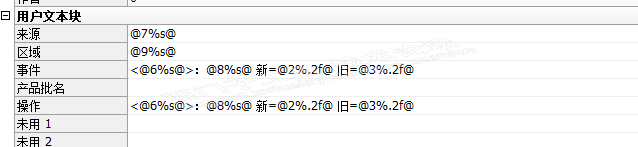
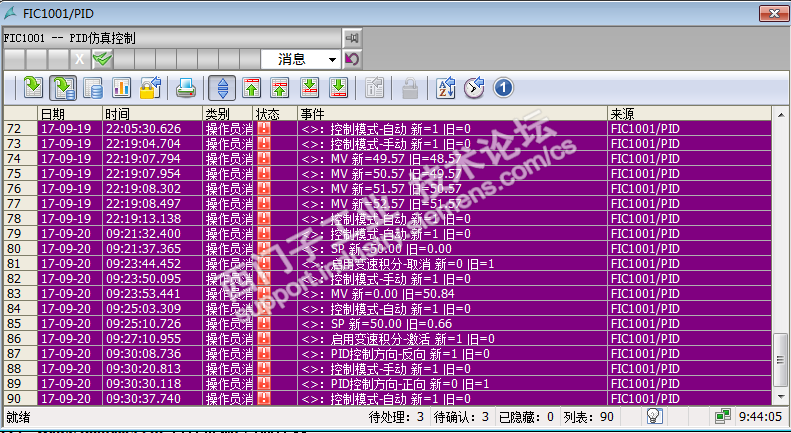
#include "apdefap.h" char*SA_ButtonOK(TCHAR*lpszPictureName,TCHAR*lpszObjectName,int MSG_NO,BOOL BitORDouble) { #define CurrentUserName "@local::@CurrentUserName" int iNewValue = 0, iOldValue = 0; double dNewValue = 0.0, dOldValue = 0.0; double dValue[5] = {0.0,0.0,0.0,0.0,0.0}; long lValue[5] = {0,0,0,0,0}; char*lpszVal[5] = {"","","","",""}; char ControlArea[_MAX_PATH+1] = ""; char*pszPicture = NULL; char*parentpic = NULL; char*parentwin = NULL; char*childpic = NULL; char*OPCaption = NULL; char*ButtonCaption = NULL; long Height = 0; char tag[_MAX_PATH+1] = ""; char*tagname = NULL; char*SetTagname = NULL; short bSetValue = 0; double dSetValue= 0.0; BOOL bInfluenceAllowed = FALSE; BOOL NoMsgConfirm = FALSE; char*szObjectName = NULL; childpic = GetParentPicture(lpszPictureName); parentpic = GetParentPicture(childpic); parentwin = GetParentPictureWindow(childpic); pszPicture = GetPropChar(lpszPictureName,"DataCollection","pszPicture"); OPCaption = GetPropChar(lpszPictureName,"DataCollection","OPCaption"); tagname = GetPropChar(lpszPictureName,"DataCollection","tagname"); SetTagname = GetPropChar(lpszPictureName,"DataCollection","SetTagname"); NoMsgConfirm = GetPropBOOL(lpszPictureName,"DataCollection","NoMsgConfirm"); if(!NoMsgConfirm) { strncpy(tag,tagname,_MAX_PATH); strncat(tag,SetTagname,_MAX_PATH-strlen(tag)); strncpy(ControlArea,tagname,_MAX_PATH); strncat(ControlArea,".#areaname",_MAX_PATH-strlen(ControlArea)); if (!BitORDouble) { bSetValue = (short)GetPropWord(lpszPictureName,"DataCollection","bValue"); iOldValue = GetTagBitWait(tag); SetTagBitWait(tag,(short)bSetValue); iNewValue = (int)bSetValue; ButtonCaption = GetPropChar(lpszPictureName,"DataCollection","ButtonCaption"); lpszVal[4] = ButtonCaption ; } else { dSetValue = GetPropDouble(lpszPictureName,"DataCollection","dValue"); dOldValue = GetTagDoubleWait(tag); SetTagDoubleWait(tag,dSetValue); dNewValue = dSetValue; } lpszVal[0] = GetTagChar(CurrentUserName); lpszVal[1] = tagname; lpszVal[2] = OPCaption; lpszVal[3] = GetTagChar(ControlArea); if (!BitORDouble) { lValue[0] = MSG_NO; lValue[1] = iNewValue; lValue[2] = iOldValue; } else { dValue[0] = MSG_NO; dValue[1] = dNewValue; dValue[2] = dOldValue; } SA_OperationMessage(lpszPictureName,MSG_NO,lValue,dValue,lpszVal,BitORDouble); } SetPropBOOL(lpszPictureName,"DataCollection","NoMsgConfirm",FALSE); bInfluenceAllowed = GetPropBOOL(lpszPictureName,"AlwaysOnTop","InfluenceAllowed"); if(bInfluenceAllowed) { SetPropBOOL(pszPicture,"CaptionBackGround","Visible",FALSE); Height = (long)GetHeight(childpic,"ViewWindow") + (long)GetTop(childpic,"ViewWindow")+32; SetHeight(parentpic,parentwin,Height); SetPropChar(childpic,"OperationWindow","PictureName",NULL); SetPropBOOL(childpic,"OperationWindow","Visible",FALSE); } else { SetPropBOOL(lpszPictureName,"Button_1","Pressed",FALSE); SetPropBOOL(lpszPictureName,"Button_2","Pressed",FALSE); SetPropBOOL(lpszPictureName,"Button_3","Pressed",FALSE); Set_Focus(lpszPictureName,"Button_Cancel"); SetPropBOOL(lpszPictureName,"Button_OK","Operation",FALSE); } return "button ok"; } 这是我项目中确认按钮的脚本,带操作记录的,你可以参考一下 #include "apdefap.h" #pragma code("ssmrt.dll") #include "ssmrt.h" #pragma code() #pragma option(mbcs) void SA_OperationMessage(TCHAR*lpszPictureName, int nMsgNr, long lValue[5], double dValue[5], char*lpszVal[5], BOOL BitORDouble) { BOOL bOK; CMN_ERROR Error; MSG_RTDATA_INSTANCECOMMENT_STRUCT MsgCreate; MsgCreate.dwMsgState = MSG_STATE_COME; MsgCreate.dwMsgNr = nMsgNr; MsgCreate.wPValueUsed = 0x001F; MsgCreate.wTextValueUsed = 0x03E0; if(BitORDouble) { MsgCreate.dPValue[0] = dValue[0]; // @1%x@ ; x can be replaced by d,f MsgCreate.dPValue[1] = dValue[1]; // @2%x@ ; x can be replaced by d,f MsgCreate.dPValue[2] = dValue[2]; // @3%x@ ; x can be replaced by d,f MsgCreate.dPValue[3] = dValue[3]; // @4%x@ ; x can be replaced by d,f MsgCreate.dPValue[4] = dValue[4]; // @5%x@ ; x can be replaced by d,f } else { MsgCreate.dPValue[0] = lValue[0]; // @1%x@ ; x can be replaced by d,f MsgCreate.dPValue[1] = lValue[1]; // @2%x@ ; x can be replaced by d,f MsgCreate.dPValue[2] = lValue[2]; // @3%x@ ; x can be replaced by d,f MsgCreate.dPValue[3] = lValue[3]; // @4%x@ ; x can be replaced by d,f MsgCreate.dPValue[4] = lValue[4]; // @5%x@ ; x can be replaced by d,f } strcpy(MsgCreate.mtTextValue[5].szText, lpszVal[0]); // @6%s@ strcpy(MsgCreate.mtTextValue[6].szText, lpszVal[1]); // @7%s@ strcpy(MsgCreate.mtTextValue[7].szText, lpszVal[2]); // @8%s@ strcpy(MsgCreate.mtTextValue[8].szText, lpszVal[3]); // @9%s@ strcpy(MsgCreate.mtTextValue[9].szText, lpszVal[4]); // @10%s@ bOK= MSRTCreateMsgInstanceWithComment(0,&MsgCreate,&Error); if (!bOK) { printf("MSRTCreateMsgInstanceWithComment szErrorText = %s } } 在消息中建立一个消息
这是效果图 <>里面就是登录名称,你可以参考下 |












 技术支持
技术支持 AI小西
AI小西
 风驰卡
风驰卡 产品入门
产品入门 在线产品选型
 售后登记和质保查询

 备件商城
备件商城 ASP工程师验证
 ASP公司证书验证
 售后服务常见问题
 首页
首页 售前文档(样本、宣传册等)
  售后文档(FAQ、手册等)
 首页
首页 立即开通1847会员
 首页
首页 教室培训课
教室培训课 取证训练营
取证训练营 在线自学课
在线自学课 认证证书查询
 培训伙伴验证
 首页
首页 最新发帖
最新发帖 精华帖
精华帖 发新帖
发新帖 已解决问题
已解决问题 精华常见问题
 运维工程师专区
 官方商城
官方商城