














 西门子官方商城
- {{item.name}}
更多
常问问题
 5.0 分
5.0 分
TIA Portal 中的 Multiuser Engineering
文档编号:109740141|
文档类型:常问问题|
发布时间:2023年10月18日
- 0
- 1107
- 5
通过 TIA Portal 中的 Multiuser Engineering,您可以同时与多个其它用户合作开展项目。由于可在多用户项目中对不同的对象进行并行编辑,因此可大幅缩短组态时间。
With Multiuser Engineering in TIA Portal, you can work with multiple users together and simultaneously on a project. By processing different objects in parallel within a multiuser project, you can significantly shorten the project planning and commissioning times.
TIA Portal provides you with various server constellations for the functionality of multiuser engineering. This application example describes the parallel processing of projects with a "temporary multiuser server", in which the server functionality is realized on a dedicated server. The multiuser server projects are also stored on the dedicated server.
In order to be able to work simultaneously with several agents in a multiuser server project within the framework of Multiuser Engineering, each agent must create their own local session. In the local session, the respective editor can insert his changes and then check these changes into the multiuser server project and publish them. After check-in, the changes from the local session are available again to all editors in the server project.
In addition to Multiuser Engineering, Multiuser Commissioning allows you to carry out joint commissioning in a team just as conveniently.
Working with Exclusive Engineering allows you to conveniently work on your project as a "single user", but with all the advantages that the TIA Project-Server offers.
The following figure shows the server constellation "Multiuser server as dedicated server".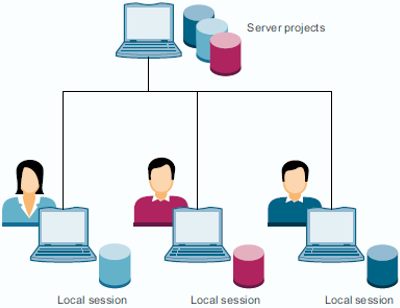
This application example describes the following aspects:
- Configuring and managing a multiuser server
- Creating and managing multiuser server projects
- Creating and managing local sessions
- Marking and checking in objects in a local session
- Updating a local session
- Exporting a local session as single-user project
- Editing objects in the server project view
- Joint commissioning with Multiuser Commissioning in synchronous and asynchronous mode
- Joint commissioning without Multiuser Commissioning
- Exclusive work with the project server (Exclusive Engineering)
- Export and import of server projects in the Administration Tool
Documentation
MultiUser Engineering with TIA Project-Server (2,7 MB)
Last Changes
Name harmonization
您可以前往全球资源库查看此文档: https://support.industry.siemens.com/cs/cn/zh/view/109740141


- 评论
更多
-
分享

手机扫码分享文档(需在手机端重新登录账号)
- 收藏 收藏
- 点赞 点赞
- 纠错 纠错





 关联文档
关联文档
- SIMATIC PCS 7 Advanced Engineering System入门指南
- 如何使用 Excel 应用程序访问 WinCC (TIA Portal)中的操作面板变量?
- 怎样在TIA Portal V11 使用CP1613 A2 连接S7 PLC?
- 如何解决由于DCOM设置的问题而无法安装TIA Portal V11
- TIA Portal - 最重要的文档和链接总览
- TIA Portal V11中组态FM350-1
- 使用 TIA Portal 为G120变频器分配 IP 地址和命名
- 在 WinCC (TIA Portal) 中,如何使用 S7 路由给触摸屏传送项目?
- 如何把一个 WinCC flexible 创建的操作面板项目集成到一个 TIA Portal 项目中?
- 在哪里能获得当前的试用产品软件 TIA Portal STEP 7 V13, WinCC V13 和 Startdrive V13?
 看过该文档的用户还看过哪些文档




{{item.nickName}}