















 西门子官方商城
- {{item.name}}
更多

PH和IS硬件选型

发布时间:2024年08月05日
- 0
- 364
本章节介绍了如何根据计算项目所需的硬盘空间,根据项目的负荷来选择PH和IS服务器的计算机硬件。
PH/IS产品选型
1 PH/IS的硬件选型
Information Server对硬件的要求并不高,可以和PH部署在同一台服务器上,单独部署时对服务器的硬件要求并不高。PH可以独立,也可以和IS部署在一台计算机上,PH对计算机的硬件配置要求较高,尤其是硬盘,详细的要求可以参考PH手册:
https://support.industry.siemens.com/cs/us/en/view/109802474
PH 2014 系统手册
https://support.industry.siemens.com/cs/cn/zh/view/109809287
Process Historian 2020 SP2 系统手册
在确定需使用的硬件设备之前,必须:
• 估算预期使用的变量和消息载荷。
• 确定 Process Historian 中数据的存储时间。
根据以上数据,可确定所需的硬盘存储容量。使用“PH-HWAdvisor”工具,可根据具体项目计算 Process Historian 的硬件配置。
https://support.industry.siemens.com/cs/ww/en/view/109740115
PH-HW Advisor工具下载
以下列出了预设的组态限值为例:
• Process Historian 组态有 6 个运行系统段和 1 个未来段。
• 压缩系数为“10”。
• Process Historian 数据库中数据的有效期为 2 年。
• 系统基于相关变量的上限,计算所需存储空间。
手册中给出一些建议如下图所示:
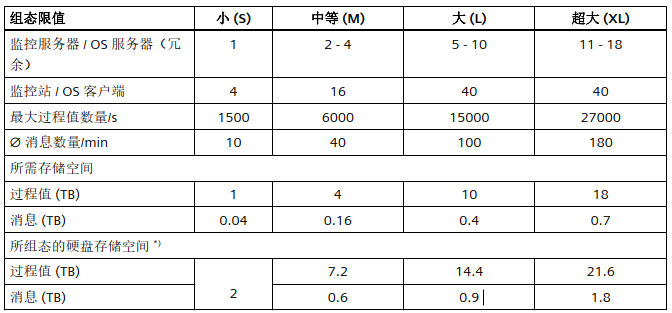
表2-1 PH的性能
对于中等组态限值 (M)的服务器硬件,推荐的配置如下:
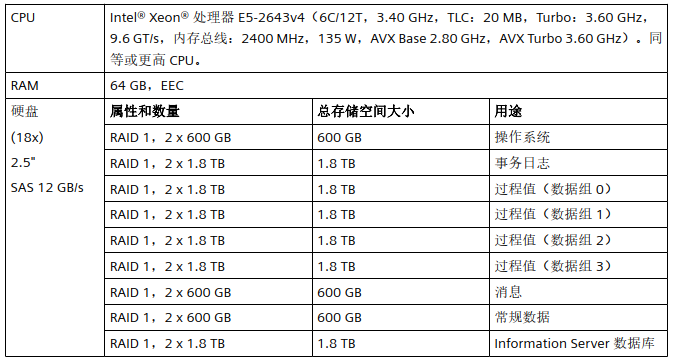
表2-2 中等负荷的PH推荐配置
如果PH还归档了BATCH数据,那么服务器的硬盘空间需要增加,如下所示:

表2-3 带配方数据的中等负荷配置推荐

- 评论
更多
-
分享
扫码分享
- 收藏 收藏
- 点赞 点赞
- 纠错 纠错








{{item.nickName}}