














 西门子官方商城
- {{item.name}}
更多

IS初始化

发布时间:2024年08月05日
- 0
- 93
本章节介绍了安装完IS后如何进行初始化的相关设置.
IS初始化
在Information Server安装完成后第一次重启计算机时,配置管理器会自动启动。可以在自动配置的对话,系统会自动启动IS的初始化向导,如下图所示选择。
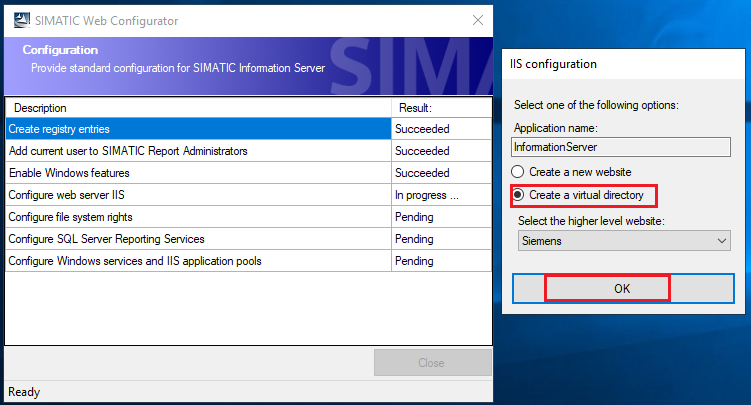
图3.3-1 IS初始化向导
最后输入访问的用户名和密码,如下所示。

图3.3-2 输入IS的账户
接下来,输入报表服务器的实例。
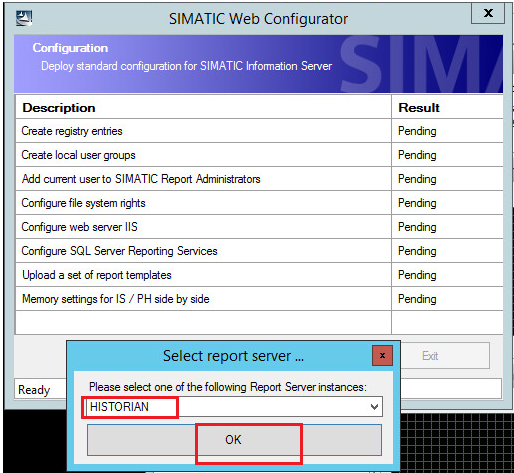
图3.3-3 选择报告服务实例
最后一步,输入IIS服务的端口号80,并选择为ISS创建一个“虚拟目录”。

图3.3-4 设置IIS的端口号
最后初始化完成。
详细的IS 安装和使用,请参考:
https://www.ad.siemens.com.cn/download/documentdetail_7689.html
【A0872_3】如何安装PCS 7 Information Server
https://www.ad.siemens.com.cn/download/documentdetail_7710.html
【A0869】Information Server 使用入门

- 评论
更多
-
分享
扫码分享
- 收藏 收藏
- 点赞 点赞
- 纠错 纠错







{{item.nickName}}