















 西门子官方商城
- {{item.name}}
更多

开始批生产

发布时间:2024年08月23日
- 0
- 333
本章节介绍了完成生产任务的创建和发布后,即可开始执行BATCH生产。
开始批生产
完成生产任务的创建和发布后,即可开始执行BATCH生产,如下图:

图5-29开始执行Batch生产
BATCH运行状态如下图,在运行过程中操作员也可以通过工具栏执行暂停、恢复等操作:
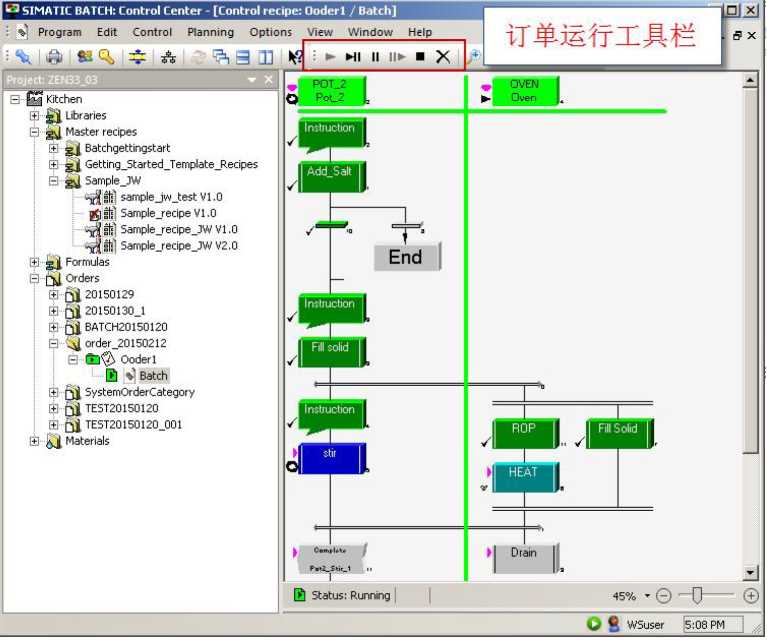
图5-20 Batch执行状态和控制
BATCH 运行结束后,会自动进入“complete”状态,点击“close”关闭批生产任务:
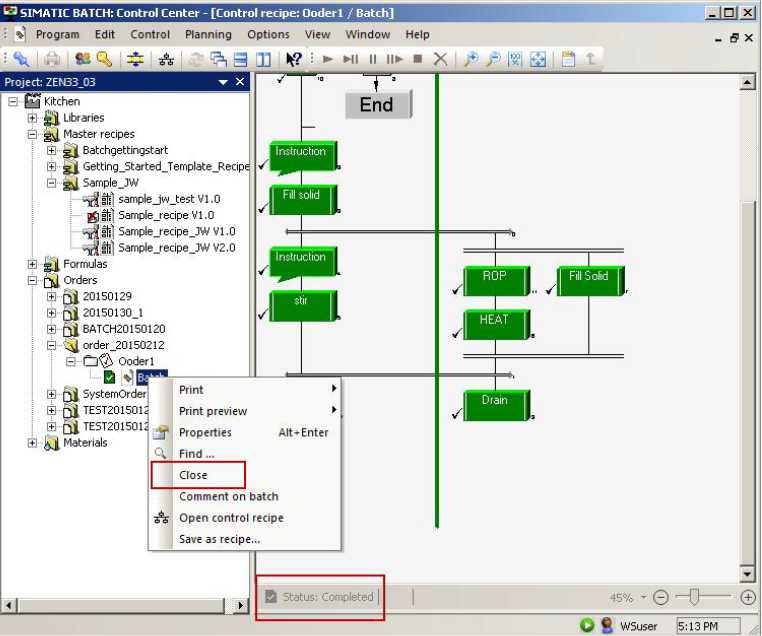
图 5-21 关闭Batch
关闭Batch的过程会花费一小段时间,之后Batch任务进入“completed +closed”状态,如下图:

图 5-22配置归档
设置完归档路径后,鼠标右击Batch,选择“Archive”进行归档,完成后的状 态如图:

图5-23 Batch归档完成
Batch的归档文件可以通过Batch CC中的归档查看器重新打开,在“Options” 菜单中点击 “start viewer of archived batches” 即可。

- 评论
更多
-
分享
扫码分享
- 收藏 收藏
- 点赞 点赞
- 纠错 纠错








{{item.nickName}}