















 西门子官方商城
- {{item.name}}
更多
应用实例与扩展工具
 5.0 分
5.0 分
用于评估SITOP SEL1200/SEL1400诊断接口“COM”和可视化设备数据的功能块和面板
文档编号:109763709|
文档类型:应用实例与扩展工具|
发布时间:2023年12月20日
- 0
- 1445
- 6
SEL1200/1400直流分路保护模块 与 SIMATIC系列PLC的DI通道连接建立通信,这里提供了通信必备的功能块和WinCC预制面板(博图库文件)
The selectivity modules SITOP SEL1200 and SEL1400 have a diagnostic interface "COM" whose signal can be evaluated via a digital input in a high-lever controller, e. g. S7-1200 CPU and S7-1500 CPU.
The diagnostic interface "COM" of the SEL1200 and SEL1400 provides a signal that transmits the following device data as a Manchester code:
- Status information
- Current output current values at the outputs
- Current limit values at the outputs
- Device information
Solution
The following library provides function blocks for SIMATIC S7-1200, S7-1500 and S7-300/S7-400 as well as faceplates for SIMATIC Comfort Panels. The function blocks enable you to read in and evaluate the signal of the diagnostic interface "COM" via a digital input at the S7-CPU. You can use the faceplates to clearly display the device data on an HMI control panel.
Note
- The library blocks for SIMATIC S7-1500 can also be used in an ET 200SP CPU and ET 200pro CPU.
- The library blocks for SIMATIC S7-300/S7-400 can also be used in an ET 200S CPU and ET 200pro CPU.
The following figure shows the graphic representation of the solution.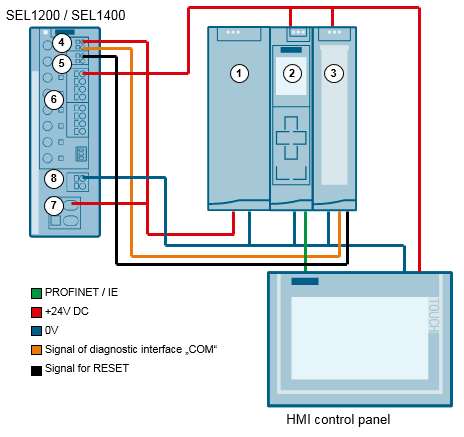
Fig. 1
| No. | Description |
|---|---|
| 1 | Power supply |
| 2 | CPU with function block (FB) |
| 3 | Digital input module / Digital output module (DI / DO) |
| 4 | Diagnostic interface "COM" |
| 5 | RESET input "RST" |
| 6 | Output 1 to 8 24 V DC |
| 7 | Input 24 V DC |
| 8 | GND |
Table 1
Library for WinCC Unified (TIA Portal V17)
109763709_SEL_STEP7_V17_LIB_V1-0-0_en.pdf (3,0 MB)
LSEL_V17.0-0_V1-0-3.zip (4,6 MB)
Library for WinCC Advanced (TIA Portal V15)
 Documentation Library "LSEL_V15.0-0_V1-0-0" (3,3 MB)
Library for STEP 7 V15 (3,7 MB)
 Library for STEP 7 V5 (35,9 KB)
Last change
Add the documentation and the library for WinCC Unified V17
https://support.industry.siemens.com/cs/cn/zh/view/109763709


- 评论
更多
-
分享

手机扫码分享文档(需在手机端重新登录账号)
- 收藏 收藏
- 点赞 点赞
- 纠错 纠错





 关联文档
关联文档
- APL风格的功能块图标和面板设计
- SIMATIC WinCC V8.1过程可视化系统 (SCADA)
- 如何通过设备数据文件(GSD)将驱动装置集成到 TIA Portal 中?
- SINAMICS G120变频器模拟量死区和线性化设定
- 如何在PDM 中使用FF设备的功能块
- 使用FB126功能块对PROFIBUS DP和PROFINET IO网络进行诊断时要注意什么?
- 在STEP7 V15或更高版本中,如何通过S7-1200/S7-1500集成PROFINET接口和连接的CP,使用冗余Modbus/TCP通信功能块?
- 机械设备的功能安全/安全性/TUEV, TÜV(技术检验协会)
- 离线方式下使用Trace功能记录SINAMICS驱动数据的方法
- SITOP 折页
 看过该文档的用户还看过哪些文档







{{item.nickName}}