











 西门子官方商城
- {{item.name}}
更多
常问问题
 5.0 分
5.0 分
如何在 WinCC SCADA (V7)的 IO 域中实现线性缩放
文档编号:109780723|
文档类型:常问问题|
发布时间:2025年08月14日
- 0
- 554
- 0
在实际应用中,很多时候都需要在 WinCC Runtime 中对不同单位参数进行数据转换,例如:“克--千克”,通过 VB 脚本可以快速的实现数据的转换。 本FAQ 中详细描述了如何实现输入值和输出值的线性缩放。
问题
用户无法直接在 IO 域中输入缩放参数值,例如,将 IO 域中的值按比例(例如 1000)进行缩放。
解决方案
为了实现相应功能,需要对一个 IO 域创建两个 VB 脚本。
在 IO 域的 “输入值” 属性的 “事件-->变化时执行” 中添加下列脚本:
Code block
'Reading the PLC variable "Integer"
Dim IntegerScal
Set IntegerScal = HMIRuntime.Tags("Integer")
'Assigning the value of the IO field
item.OutputValue = value
'Scaling the value with your chosen scaling factor
IntegerScal.Value = item.OutputValue * Scaling factor
'Writing the variable
IntegerScal.Write
下图中显示了相关设置(如图1)。
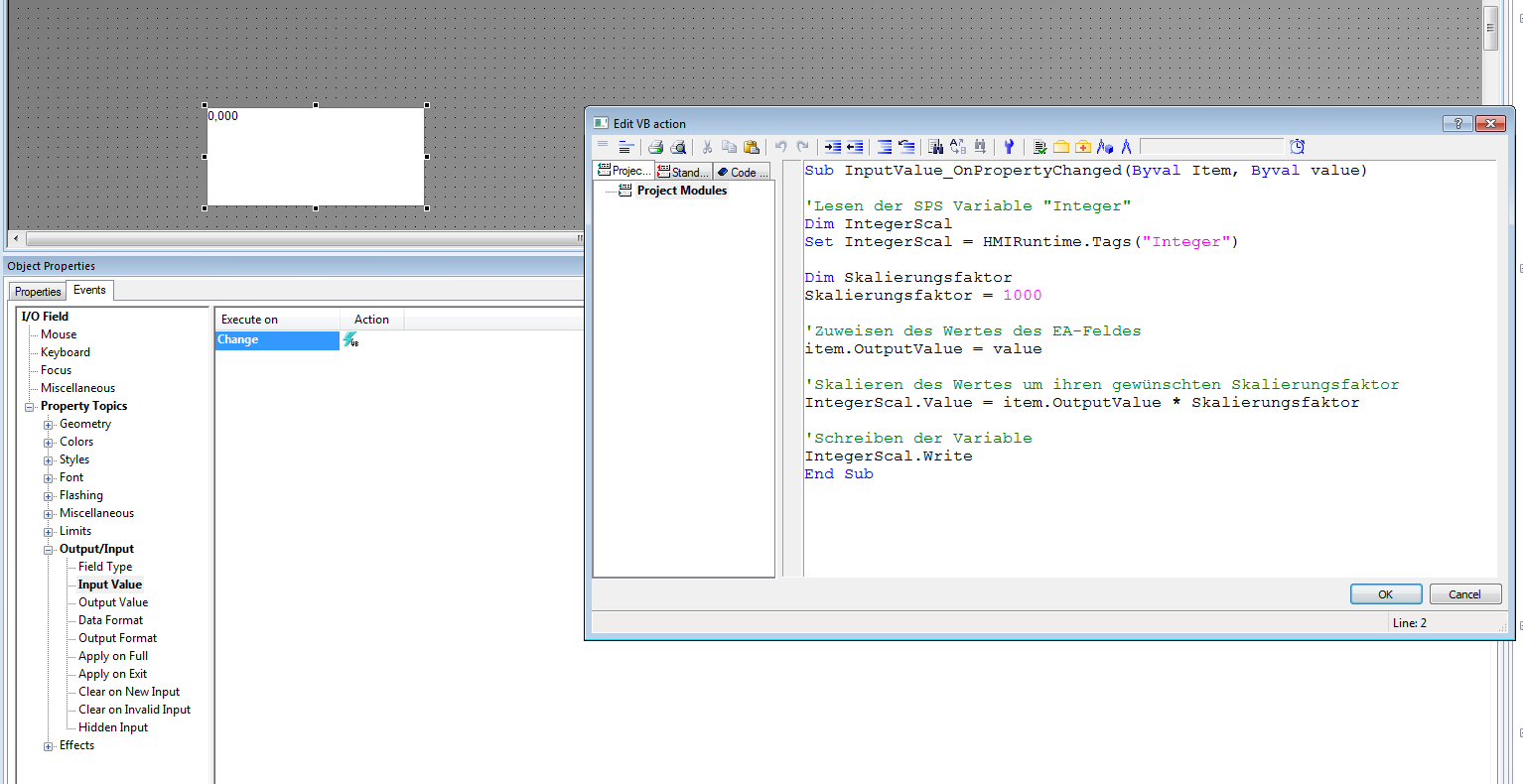
图. 1
用户同时需要在“过程值”属性中添加 VB 脚本。
首先需要读取 PLC 中的变量值,将其除以一个比例因子(例如 1000),然后将结果传送给过程值。
Code block
'Reading the PLC variable "Integer"
Dim IntegerScal
Set IntegerScal = HMIRuntime.Tags("Integer")
IntegerScal.Read
'Scaling the process value by the scaling factor
OutputValue_Trigger = IntegerScal.Value / Scaling factor
为了正确的触发上述脚本,需要把 PLC 变量 “Integer” 的扫描模式设置为“有变化时”(如图2)。
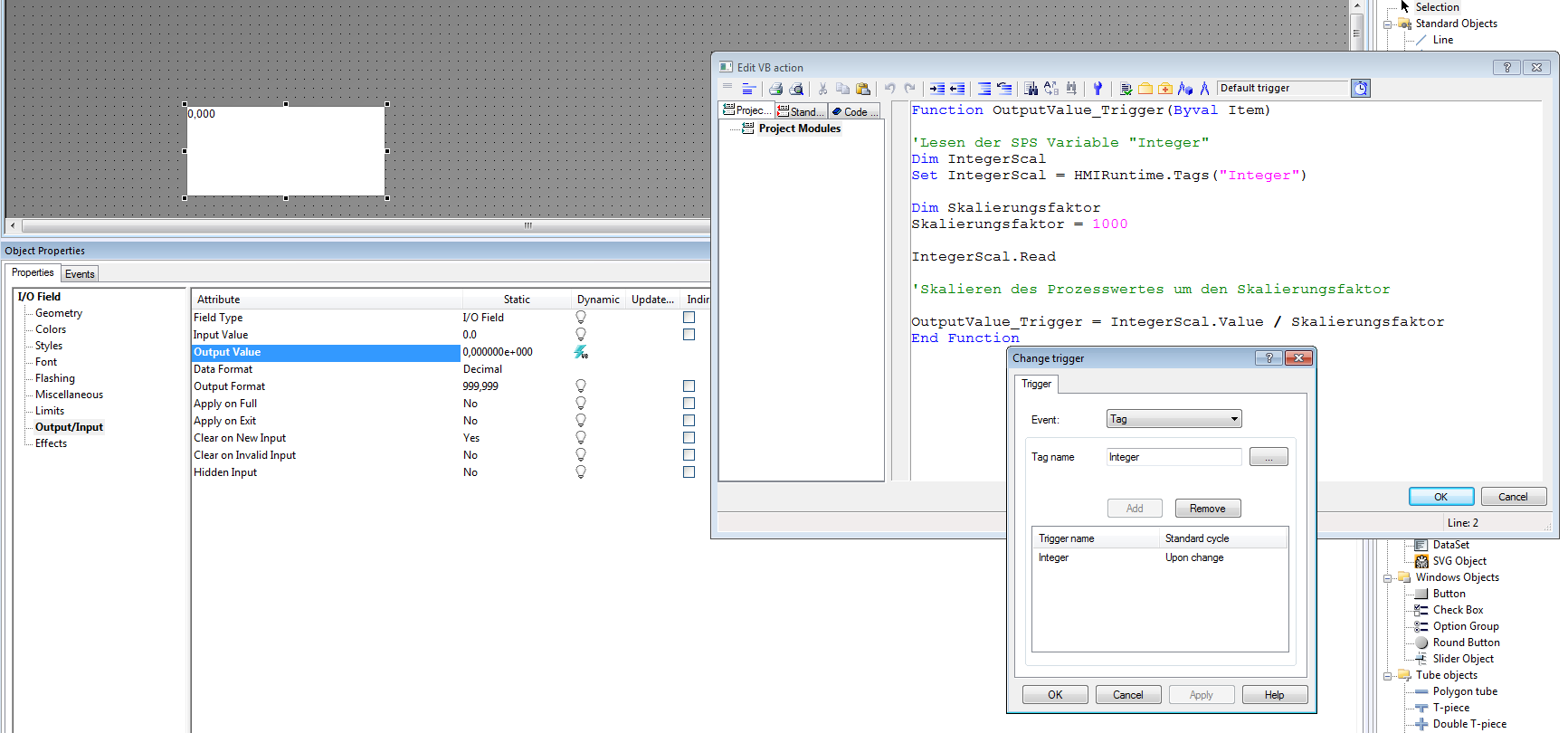
图. 2


- 评论
更多
-
分享

手机扫码分享文档(需在手机端重新登录账号)
- 收藏 收藏
- 点赞 点赞
- 纠错 纠错





 关联文档
关联文档
- 在 WinCC SCADA (V7.x 和 TIA Prof)中使用 CASE 语句时如何避免“语法检查返回了错误”?
- 怎样解决 WinCC SCADA (V7) 客户端脚本不工作的问题?
- 如何在MM420中实现本地/远程控制
- 如何在C#中实现OPC数据访问
- 如何在PCS 7中实现模拟量累计功能
- 如何在SCL中实现循环执行S_ODT定时器
- 在 WinCC Professional 中如何对输入输出域的数值进行比例缩放?
- 如何在 WinCC V7 的 Audit Viewer 中按日期和时间正确过滤数据?
- 如何实现WinCC V7和S7-400H PN的工业以太网通信
- SIMATIC WinCC V8.1过程可视化系统 (SCADA)
 看过该文档的用户还看过哪些文档







{{item.nickName}}