升级SP1显示失败,桌面上原来的WINCC图标也不见了,哪位大佬知道怎么解决?
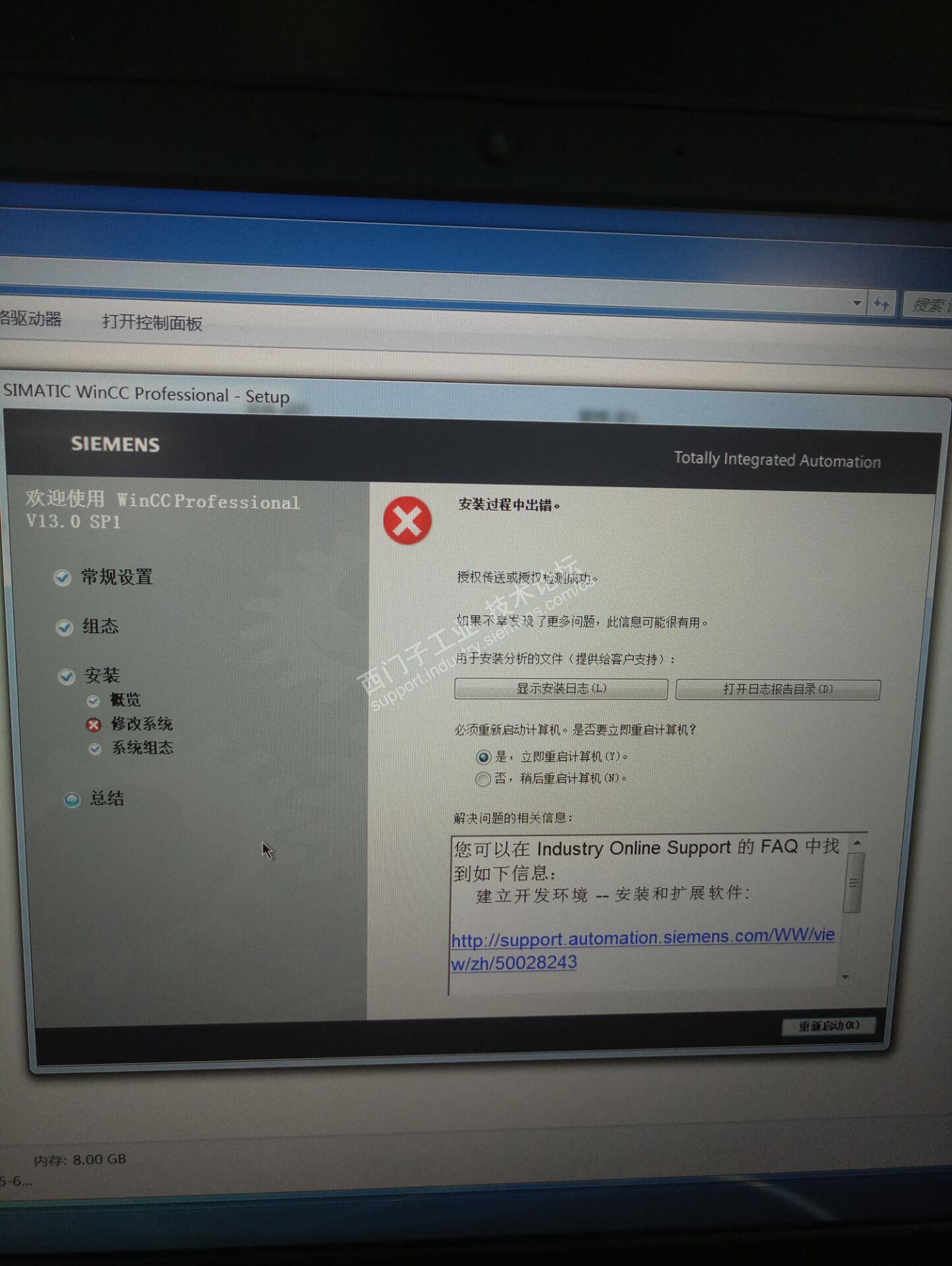
安装日志:
2017.07.09 09:21:56 - Year.Month.Day - Log start
BUNDLE: SIMATIC WinCC Professional V13.0 SP1
SEBU Version: Professional:TIA.rgs.RTM_13000100:V13.00.01.00_25.01.00.01
OS: Microsoft Windows 7 旗舰版 Ultimate Edition, Service Pack 1, 64-bit, build 7601
COMMANDLINE: C:\Program Files (x86)\Common Files\Siemens\Automation\Siemens Installer Assistant\306\SIA2.exe /starter /bundlepath=D:\XK\学习\西门子逻辑控制\书记文件\博图解压完\5.WINCC SP1\InstData
INSTALLDIR: C:\Program Files (x86)\Siemens\Automation
SETUPLANGUAGE: 2052
CHANGES: (+)DotNet_Updater;(+)SYMLINK;(+)SYMLINKADD;(o)WinCC ACE;(o)WinCC Common Archiving;(o)OPC;(o)WinCC Runtime Advanced Simulator;(o)PTSymLib;(o)PTTouchInput;(o)STOBS;(o)AlmPanelPlugin64;(o)Prosave;(o)TIA_ES;(o)SCADA-RT;(o)RT_Pro_Sim;(o)CoRtHmiRTmDriver64;(o)HMIRTMV11;(o)RT_Adv_Sim
There are NO severe messages before the installation
09:21:56 | BEGIN. Execution started.
09:22:00 | OK RunningProcesses (), Complete
09:22:00 | OK InventoryBefore (A), Complete
09:22:00 | OK Citamis (Before), Complete
09:22:39 | OK SecurityControlFeature (ReturnFeatures), Complete
09:22:40 | OK StartApplBefore ([INSTALLDIR]BIN\SIEMENS.AUTOMATION.OBJECTFRAME.FILESTORAGE.SERVER.EXE), Complete
09:22:43 | OK StartApplBefore ([INSTALLDIR]X64\BIN\SIEMENS.AUTOMATION.OBJECTFRAME.FILESTORAGE.SERVER.EXE), Complete
09:22:43 | OK ClassicCompPrepare (), Complete
09:22:43 | OK ProductRegistration (Before), Complete
09:22:44 | OK ClassicCompAfterUninstall (), Complete
09:22:45 | OK SetupUnit (DotNet_Updater), Complete - - Foreign, AddLocal
09:22:45 | OK SetupUnit (SYMLINK), Complete - - Foreign, AddLocal
09:22:51 | OK SetupUnit (SYMLINKADD), Complete - - Foreign, AddLocal
09:22:51 | OK SecurityControl (WinCC ACE), Complete;Before
09:26:05 | OK SetupUnit (WinCC ACE), Complete - - ClassicComponent, Reinstall
09:26:31 | OK SecurityControl (WinCC ACE), Complete;After
09:28:15 | OK SetupUnit (WinCC Common Archiving), Complete - - ClassicComponent, Reinstall
09:28:26 | OK SetupUnit (OPC), Complete - - ClassicComponent, Reinstall
09:28:38 | OK SetupUnit (WinCC Runtime Advanced Simulator), Complete - - ClassicComponent, Reinstall
09:28:57 | OK SetupUnit (PTSymLib), Complete - - ClassicComponent, Reinstall
09:29:08 | OK SetupUnit (PTTouchInput), Complete - - ClassicComponent, Reinstall
09:29:19 | OK SetupUnit (STOBS), Complete - - ClassicComponent, Reinstall
09:29:39 | OK SetupUnit (AlmPanelPlugin64), Complete - - ClassicComponent, Reinstall
09:30:50 | OK RebootAfterAll SetupUnit (Prosave), Complete - - ClassicProduct, Reinstall
09:37:28 | OK SetupUnit (TIA_ES), Complete - - PlusOptional, Reinstall
09:37:29 | OK SecurityControl (SCADA-RT), Complete;Before
09:38:18 |ERROR AdsWorkerSetupPackage::OnWorkerCompleted(): - SetupPackage setup failed due to unknown error
09:38:18 | FAIL! SetupUnit (SCADA-RT), Failed - - PlusMain, Reinstall
09:38:18 | OK SecurityControl (SCADA-RT), Complete;After
09:38:19 |WARNING InstallResultSetupPackage::ReadResult(): - RT_Pro_Sim - Setup Package Message: Type(Error); Severity(AfterInstall); Text(The EditionMain SCADA-RT_V11 isn't installed or doesn't have the required version.| found version: | allowed version: min 1.0.0 |
09:38:19 |ERROR AdsWorkerSetupPackage::OnWorkerCompleted(): - SetupPackage setup failed due to unknown error
09:38:19 | FAIL! SetupUnit (RT_Pro_Sim), Failed - - PlusOptional, Reinstall
09:39:46 | OK SetupUnit (CoRtHmiRTmDriver64), Complete - - ClassicComponent, Reinstall
09:39:46 | OK SecurityControl (HMIRTMV11), Complete;Before
09:40:11 | OK RebootAfterAll SetupUnit (HMIRTMV11), Complete - - PlusMain, Reinstall
09:40:14 | OK SecurityControl (HMIRTMV11), Complete;After
09:40:21 | OK SetupUnit (RT_Adv_Sim), Complete - - PlusOptional, Reinstall
09:40:21 | OK ClassicCompAfterInstall (), Complete
09:40:21 | OK ClassicCompRollback (), Complete
09:40:28 | OK HspInstall (), Complete
09:47:10 | OK StartApplAfter ([INSTALLDIR]BIN\SIEMENS.AUTOMATION.GENERATOR.FRAMEWORK.EXE), Complete
09:47:12 | OK ProductRegistration (After), Complete
09:47:12 | OK SetupIsComplete (), Complete
09:47:13 | OK InventoryAfter (Z), Complete
09:47:16 | OK LicenseTransfer (), Complete
09:47:16 | OK Citamis (After), Complete
09:47:16 | OK SetupSummary (), Complete
09:49:22 | OK SetupReport (), Complete
09:49:22 | END. Execution completed.
Exit code: 1603
Errors: 2
Warnings: 1
Exit code means: Installation failed (InstallFailure)












 西门子商城
西门子商城 西门子中国
西门子中国



 普通
普通


 本版热门话题

 相关推荐
相关推荐 相关帖子推荐











