










 技术支持
技术支持 AI小西
AI小西
 风驰卡
风驰卡 产品入门
产品入门 在线产品选型
 售后登记和质保查询

 备件商城
备件商城 ASP工程师验证
 ASP公司证书验证
 售后服务常见问题
 首页
首页 售前文档(样本、宣传册等)
  售后文档(FAQ、手册等)
 首页
首页 立即开通1847会员
 标准机型应用中心
 首页
首页 教室培训课
教室培训课 取证训练营
取证训练营 在线自学课
在线自学课 认证证书查询
 培训伙伴验证
 首页
首页 最新发帖
最新发帖 精华帖
精华帖 发新帖
发新帖 已解决问题
已解决问题 精华常见问题
 官方商城
官方商城 西门子中国
西门子中国


 普通
普通

 本版热门话题

 相关推荐
相关推荐 相关帖子推荐
恭喜,你发布的帖子

发布于 2017-08-15 15:11:05
1楼
使用C脚本GMsgFunction,可以根据消息编号及状态做一些事情:
现在报警中勾选:
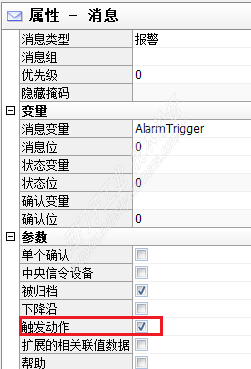
然后打开全局C动作,标准函数--Alarm--双击“GMsgFunction”,修改为:
BOOL GMsgFunction( char* pszMsgData)
{
MSG_RTDATA_STRUCT mRT;
memset( &mRT, 0, sizeof( MSG_RTDATA_STRUCT ) );
if( pszMsgData != NULL )
{
printf( "Meldung : %s \r\n", pszMsgData );
// Meldungsdaten einlesen
sscanf( pszMsgData, "%ld,%ld,%04d.%02d.%02d,%02d:%02d:%02d:%03d,%ld, %ld, %ld, %d,%d",
&mRT.dwMsgNr, // Meldungsnummer
&mRT.dwMsgState, // Status MSG_STATE_COME, .._GO, .._QUIT, .._QUIT_SYSTEM
&mRT.stMsgTime.wYear, // Jahr
&mRT.stMsgTime.wMonth, // Monat
&mRT.stMsgTime.wDay, // Tag
&mRT.stMsgTime.wHour, // Stunde
&mRT.stMsgTime.wMinute, // Minute
&mRT.stMsgTime.wSecond, // Sekunde
&mRT.stMsgTime.wMilliseconds, // Millisekunde
&mRT.dwTimeDiff, // Zeitdauer der anstehenden Meldung
&mRT.dwCounter, // Interner Meldungsz?hler
&mRT.dwFlags, // Flags( intern )
&mRT.wPValueUsed,
&mRT.wTextValueUsed );
}
printf("Nr : %d, St: %x, %d-%d-%d %d:%d:%d.%d, Dur: %d, Cnt %d, Fl %d\r\n" ,
mRT.dwMsgNr, mRT.dwMsgState, mRT.stMsgTime.wDay, mRT.stMsgTime.wMonth, mRT.stMsgTime.wYear,
mRT.stMsgTime.wHour, mRT.stMsgTime.wMinute, mRT.stMsgTime.wSecond, mRT.stMsgTime.wMilliseconds, mRT.dwTimeDiff,
mRT.dwCounter, mRT.dwFlags ) ;
if (mRT.dwMsgState==1)//如果报警状态为到来
{
if (mRT.dwMsgNr==1) //如果报警编号为1
{
SetTagBit("Tag1",1); //执行置位操作
}
}
return( TRUE );
}
其中Tag1即为需要置位的变量,注意在WinCC启动选项里勾选“全局脚本运行系统”。
请点击以下链接:
https://support.industry.siemens.com/cs/cn/zh/view/15350783
参考《当运行时消息出现时,如何在用户指定的"GMsgFunction()"动作中确定消息文本和过程值?》
请填写推广理由:

分享
只看
楼主











