













 官方商城-正品备件
 DIOMIS
 西门子中国
西门子中国


 普通
普通

 本版热门话题

 相关推荐
相关推荐 相关帖子推荐
恭喜,你发布的帖子

发布于 2017-09-23 08:09:44
2楼
#include "apdefap.h"
char*SA_ButtonOK(TCHAR*lpszPictureName,TCHAR*lpszObjectName,int MSG_NO,BOOL BitORDouble)
{
#define CurrentUserName "@local::@CurrentUserName"
int iNewValue = 0, iOldValue = 0;
double dNewValue = 0.0, dOldValue = 0.0;
double dValue[5] = {0.0,0.0,0.0,0.0,0.0};
long lValue[5] = {0,0,0,0,0};
char*lpszVal[5] = {"","","","",""};
char ControlArea[_MAX_PATH+1] = "";
char*pszPicture = NULL;
char*parentpic = NULL;
char*parentwin = NULL;
char*childpic = NULL;
char*OPCaption = NULL;
char*ButtonCaption = NULL;
long Height = 0;
char tag[_MAX_PATH+1] = "";
char*tagname = NULL;
char*SetTagname = NULL;
short bSetValue = 0;
double dSetValue= 0.0;
BOOL bInfluenceAllowed = FALSE;
BOOL NoMsgConfirm = FALSE;
char*szObjectName = NULL;
childpic = GetParentPicture(lpszPictureName);
parentpic = GetParentPicture(childpic);
parentwin = GetParentPictureWindow(childpic);
pszPicture = GetPropChar(lpszPictureName,"DataCollection","pszPicture");
OPCaption = GetPropChar(lpszPictureName,"DataCollection","OPCaption");
tagname = GetPropChar(lpszPictureName,"DataCollection","tagname");
SetTagname = GetPropChar(lpszPictureName,"DataCollection","SetTagname");
NoMsgConfirm = GetPropBOOL(lpszPictureName,"DataCollection","NoMsgConfirm");
if(!NoMsgConfirm)
{
strncpy(tag,tagname,_MAX_PATH);
strncat(tag,SetTagname,_MAX_PATH-strlen(tag));
strncpy(ControlArea,tagname,_MAX_PATH);
strncat(ControlArea,".#areaname",_MAX_PATH-strlen(ControlArea));
if (!BitORDouble)
{
bSetValue = (short)GetPropWord(lpszPictureName,"DataCollection","bValue");
iOldValue = GetTagBitWait(tag);
SetTagBitWait(tag,(short)bSetValue);
iNewValue = (int)bSetValue;
ButtonCaption = GetPropChar(lpszPictureName,"DataCollection","ButtonCaption");
lpszVal[4] = ButtonCaption ;
}
else
{
dSetValue = GetPropDouble(lpszPictureName,"DataCollection","dValue");
dOldValue = GetTagDoubleWait(tag);
SetTagDoubleWait(tag,dSetValue);
dNewValue = dSetValue;
}
lpszVal[0] = GetTagChar(CurrentUserName);
lpszVal[1] = tagname;
lpszVal[2] = OPCaption;
lpszVal[3] = GetTagChar(ControlArea);
if (!BitORDouble)
{
lValue[0] = MSG_NO;
lValue[1] = iNewValue;
lValue[2] = iOldValue;
}
else
{
dValue[0] = MSG_NO;
dValue[1] = dNewValue;
dValue[2] = dOldValue;
}
SA_OperationMessage(lpszPictureName,MSG_NO,lValue,dValue,lpszVal,BitORDouble);
}
SetPropBOOL(lpszPictureName,"DataCollection","NoMsgConfirm",FALSE);
bInfluenceAllowed = GetPropBOOL(lpszPictureName,"AlwaysOnTop","InfluenceAllowed");
if(bInfluenceAllowed)
{
SetPropBOOL(pszPicture,"CaptionBackGround","Visible",FALSE);
Height = (long)GetHeight(childpic,"ViewWindow") + (long)GetTop(childpic,"ViewWindow")+32;
SetHeight(parentpic,parentwin,Height);
SetPropChar(childpic,"OperationWindow","PictureName",NULL);
SetPropBOOL(childpic,"OperationWindow","Visible",FALSE);
}
else
{
SetPropBOOL(lpszPictureName,"Button_1","Pressed",FALSE);
SetPropBOOL(lpszPictureName,"Button_2","Pressed",FALSE);
SetPropBOOL(lpszPictureName,"Button_3","Pressed",FALSE);
Set_Focus(lpszPictureName,"Button_Cancel");
SetPropBOOL(lpszPictureName,"Button_OK","Operation",FALSE);
}
return "button ok";
}
这是我项目中确认按钮的脚本,带操作记录的,你可以参考一下
#include "apdefap.h"
#pragma code("ssmrt.dll")
#include "ssmrt.h"
#pragma code()
#pragma option(mbcs)
void SA_OperationMessage(TCHAR*lpszPictureName, int nMsgNr, long lValue[5], double dValue[5], char*lpszVal[5], BOOL BitORDouble)
{
BOOL bOK;
CMN_ERROR Error;
MSG_RTDATA_INSTANCECOMMENT_STRUCT MsgCreate;
MsgCreate.dwMsgState = MSG_STATE_COME;
MsgCreate.dwMsgNr = nMsgNr;
MsgCreate.wPValueUsed = 0x001F;
MsgCreate.wTextValueUsed = 0x03E0;
if(BitORDouble)
{
MsgCreate.dPValue[0] = dValue[0]; // @1%x@ ; x can be replaced by d,f
MsgCreate.dPValue[1] = dValue[1]; // @2%x@ ; x can be replaced by d,f
MsgCreate.dPValue[2] = dValue[2]; // @3%x@ ; x can be replaced by d,f
MsgCreate.dPValue[3] = dValue[3]; // @4%x@ ; x can be replaced by d,f
MsgCreate.dPValue[4] = dValue[4]; // @5%x@ ; x can be replaced by d,f
}
else
{
MsgCreate.dPValue[0] = lValue[0]; // @1%x@ ; x can be replaced by d,f
MsgCreate.dPValue[1] = lValue[1]; // @2%x@ ; x can be replaced by d,f
MsgCreate.dPValue[2] = lValue[2]; // @3%x@ ; x can be replaced by d,f
MsgCreate.dPValue[3] = lValue[3]; // @4%x@ ; x can be replaced by d,f
MsgCreate.dPValue[4] = lValue[4]; // @5%x@ ; x can be replaced by d,f
}
strcpy(MsgCreate.mtTextValue[5].szText, lpszVal[0]); // @6%s@
strcpy(MsgCreate.mtTextValue[6].szText, lpszVal[1]); // @7%s@
strcpy(MsgCreate.mtTextValue[7].szText, lpszVal[2]); // @8%s@
strcpy(MsgCreate.mtTextValue[8].szText, lpszVal[3]); // @9%s@
strcpy(MsgCreate.mtTextValue[9].szText, lpszVal[4]); // @10%s@
bOK= MSRTCreateMsgInstanceWithComment(0,&MsgCreate,&Error);
if (!bOK)
{
printf("MSRTCreateMsgInstanceWithComment szErrorText = %s ",Error.szErrorText );
}
}
在消息中建立一个消息
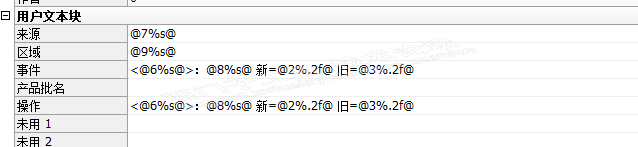

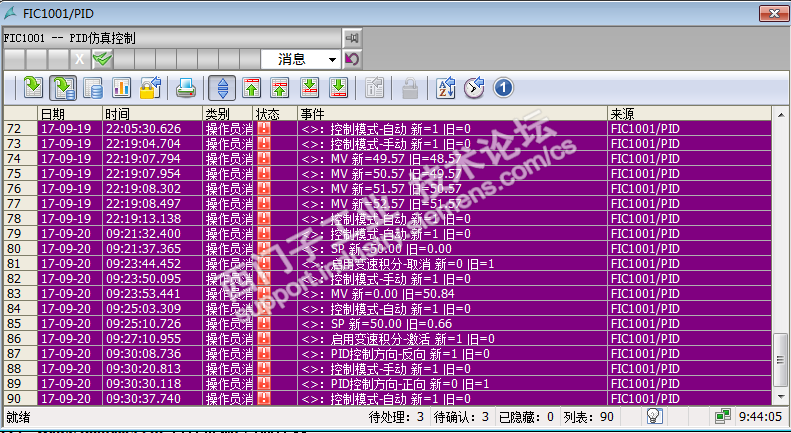
这是效果图
<>里面就是登录名称,你可以参考下
谢谢,研究一下。
wincc是不是有标准的控件能干这个事?
请填写推广理由:

分享
只看
楼主











